Tuesday, July 28, 2015

Pioneer VSX-822, ARC and Samsung UN55en7100

Problem: I want to play my pictures slideshow on my TV, also like to play my favorite songs in the background using the receiver (with external speakers). I start my slideshow using xbox which is connected to game port on the receiver. Now, I try to start my music using receiver, it changes the video output on TV.

Connect TV ARC hdmi port -----------> (PIONEER VSX-822 ) RECEIVER OUT hdmi port

For example: if you want to use Samsung picture app to connect to media server ( NAS/PC where ever you have your pictures stored). Start samsung picture app, connect to storage and start the slide show. Once you have the slide show on the TV.
Use Pioneer Receiver iphone app to connect to media server and choose the song to play.

** Samsung UN55D7000 series picture app doesn't play picture 24 mega pixel, that's why I have to switch to some thing better.

Now, I want to use xbox to display my pictures with music in background.
By the way xbox display is just fantastic, I tried plex media app, roku media player etc. but nothing like xbox quality.

One problem with Xbox is you have start the music before you start the picture slide show, and also you cannot change the songs once you start the slide show.

Now the problem, xbox is connected to game port on Receiver.
Connect TV ARC port -----------> (PIONEER VSX-822 )RECEIVER OUT hdmi port
                                                  XBOX -------->        RECEIVER   (game port)

Whenever you start Pioneer iphone app to connect to media server, it switches the video output on the receiver to media server.
Here is how it works:
Connect TV ARC port -----------> (PIONEER VSX-822 )RECEIVER OUT hdmi port
                                                  XBOX -------->        TV (hdmi port)

Bottom line once you enable ARC on the Receiver and connected to TV ARC hdmi port correctly all the device you connect to TV will pass thru the audio using the Receiver.
And if you choose to change the mode in the receiver to media server it will not change the video output on the TV 

Wednesday, July 1, 2015

Cron error

Error in cron log

tail -f /var/log/cron

Dec  3 00:21:01 lfvsfcp25961 crond[19203]: (root) CMD (/home/root/backup/backup.sh backup.pg.com)
Dec  3 00:23:01 lfvsfcp25961 crond[24488]: (root) CMD (rsync -av --progress --inplace -e "ssh -i /home/root/.ssh/backup_rsa -q -c arcfour" /data/backups/`date +")


actual cron entry

23 00 * * * rsync -av --progress --inplace -e "ssh -i /home/root/.ssh/backup_rsa -q -c arcfour" /data/backups/`date +"%Y%m"`* root@backup.pg.com:/data/backup/backups > /tmp/sync.log


Fix:
escape the % signs. They have a special meaning in crontabs:

man (5) crontab:

Percent-signs (%) in the command, unless escaped with backslash (\),
will be changed into newline characters, and all data after the
first % will be sent to the command as standard input.

23 00 * * * rsync -av --progress --inplace -e "ssh -i /home/root/.ssh/backup_rsa -q -c arcfour" /data/backups/`date +"\%\Y\%m"`* root@backup.pg.com:/data/backup/backups > /tmp/sync.log

Thursday, April 30, 2015

(CRON) ERROR chdir failed (/bin/bash): Not a directory

check /etc/passwd for typo :-(


# cat /etc/passwd
pg:x:100:100:pankaj gautam/pankaj:/bin/tcsh

# cat /etc/passwd ( : missing in root user home /root)
pg:x:100:100:pankaj gautam:/pankaj:/bin/tcsh

Sunday, January 25, 2015

Import iphone6 addressbook to Mercedes C300 (pain in the a$$)

I own a Mercedes C class 2009, It took me a week to import my first iphone address book into Command APS when I bought the car in late 2008. It was so painful that I almost lost interest after finally importing the addressbook.
After 5 years I thought of updating the address book again and went thru the same painful experience.
This time thought of documenting few steps to make life easy for next time.

I'm hoping new model have better sync capabilities, because Mercedes has crippled the bluetooth earlier models (hopefully for good reasons).

There are only three steps to import the addresses in Command APS
#1. Pair your phone/iphone6.
#2. Change Command APS into receive business cards
#3. Send the vcards/csv files to paired MB Bluetooth

I have done this so many times now, if everything works its a 30 mins task. Otherwise couple of days. Just to a reminder that Command APS has a limitation of 1000 addresses.

Prework:
#0. Sync iphone to any email client. Export all your addresses from your email client to a vcard file on any laptop (mac/pc doesn't matter) should have bluetooth.

Steps:
#1. Now pair the laptop with "MB Bluetooth". I hoping you are familiar with this step since you must be using you phone already. It's the same Command APS step System/Bluetooth/Update, it will look for yr LAPTOP and ask for pairing key. Type 2323

Look for a key prompt on the laptop, enter 2323


This is process is again sometimes painful, be patient. If it is not working try to give sometime and start again. You should see a successful connection before starting the next step.

 #2. Once you have laptop connected. Change to addressbook and start receiving business cards. You will see its waiting for new businesscards


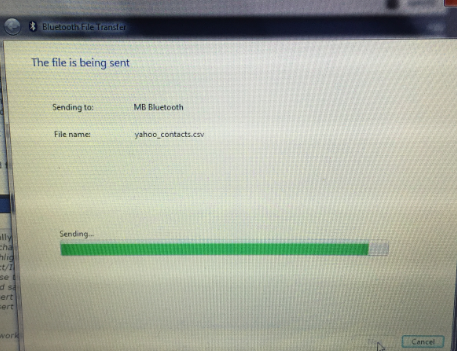
#3. From the laptop, look for "Bluetooth file transfer". Click send files. Select "MB Bluetooth". Select the vcard file you exported and click Next.

You will see Command APS receiving business cards. After its finishes you should see all your addresses in the addressbook.


Few problems and resolution:
### If you are sending csv file. It will show you a successful transmission but I guess MB doesn't know how to handle csv files for addressbook. Hence you will not see anything in the MB phone addressbook
###  After successful connection with laptop, it keep losing connection. I believe it was because of battery was draining.
### Laptop won't connect using bluetooth, try disabling bluetooth discovery and enable it again.